
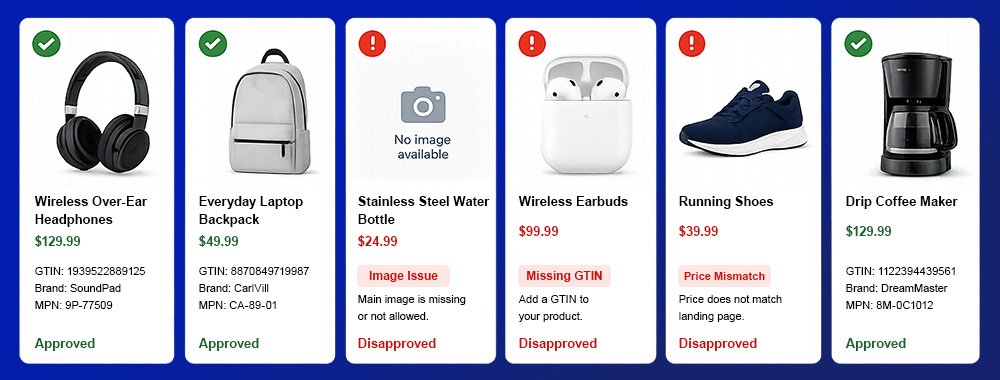
Product disapprovals and warnings in Google Merchant Center can quickly reduce product visibility across Shopping ads and free listings.
Google reviews submitted product data to confirm that it matches the product information on your website and follows Merchant Center requirements. When something does not line up, the issue may appear as a warning, limited performance notice, or disapproval.
Some issues only reduce visibility. Others prevent products from showing at all.
The good news: many of the most common Merchant Center issues can be fixed with cleaner product data, more accurate landing pages, and better product feed management.
Product Identifier Issues: GTIN, Brand, and MPN
Product identifiers help Google understand exactly what item you are selling. Common identifiers include Global Trade Item Number (GTIN), brand, and Manufacturer Part Number (MPN).
Issues can appear when these values are missing, invalid, incorrect, or inconsistent.
How to fix it:
Submit valid identifiers whenever they are available. For most products, that means including the correct GTIN, brand, and, when applicable, MPN.
Tips:
- Avoid placeholder brand values such as “N/A,” “Generic,” or “No brand.”
- For custom or handmade products without a GTIN, mark the item appropriately instead of submitting an incorrect identifier.
Excessive Capitalization
Google may flag titles that use excessive or gimmicky capitalization, especially all-caps promotional phrases like “BEST PRICE,” “FREE SHIPPING,” or “LIMITED TIME OFFER.”
These titles can make listings look less trustworthy to shoppers.
How to fix it:
Review affected titles and descriptions. Remove unnecessary capitalization and promotional language. Use normal title case or sentence case, and keep the title focused on the product itself.
Tip: Make sure titles are descriptive, accurate, and aligned with the landing page.
Image Issues
Image problems are one of the most common causes of product disapprovals. Google requires the main product image to clearly show the item being sold, without placeholders, overlays, or quality issues.
Generic or Placeholder Images
Products may be disapproved if the main image is missing, generic, logo-only, or uses placeholder text such as “No image available.”
How to fix it:
Submit a clear image of the actual product. The main image should show the principal item being sold, not a placeholder, logo, or generic category image.
Tips:
- Make sure the
image_linkURL leads to an image Google can crawl. - If the image would not help a shopper confidently identify the product, it should not be used as the main image.
Promotional Overlays
Google may disapprove products when the image includes text, retailer logos, calls to action, watermarks, badges, borders, or other elements that obstruct the product.
How to fix it:
Use clean product photography. Remove text such as “Sale,” “Free Shipping,” “20% Off,” or “Best Seller” from the main image unless that text is physically part of the product.
Image Too Small
Images that do not meet Google’s size requirements may trigger disapprovals. Non-apparel images must be at least 100 × 100 pixels. Apparel images must be at least 250 × 250 pixels. Images must also be no larger than 64 megapixels or 16 MB.
How to fix it:
Replace low-resolution images with larger, high-quality product images. Avoid thumbnails or artificially enlarged images, which can reduce quality.
Tip: Google recommends that the product take up about 75%–90% of the full image.
Invalid Google Product Category
Google may flag products when the submitted google_product_category value does not match a valid category in Google’s taxonomy.
Google accepts either the full category path or the numeric category ID. It does not accept only the final category name.
How to fix it:
Assign the most accurate Google product category using either the full path, such as:Apparel & Accessories > Clothing > Suits > Tuxedos
Or the numeric category ID, such as:1580
Tip: Avoid submitting only “Tuxedos.” Google will not accept the final category segment by itself.
Price and Availability Mismatches
Price and availability mismatches happen when feed values do not match the product landing page.
For example, a product may be submitted as in stock in the feed but appear out of stock on the website. Or the feed price may differ from the price shown on the product page.
How to fix it:
Make sure price and availability are consistent across the feed, website, structured data, and checkout experience. Pay close attention to update timing, especially for fast-changing inventory or promotional pricing.
Tip: Automate wherever possible. Frequent feed updates, accurate structured data, and reliable inventory syncing can reduce recurring mismatches.
Where to Start
Not every warning has the same impact. Start with issues that prevent products from showing, then address issues that limit performance.
In most accounts, the highest-priority fixes are:
- Product disapprovals
- Price and availability mismatches
- Identifier issues
- Image problems
- Missing required attributes
Cleaner product data reduces preventable disapprovals and gives Google a more accurate view of your catalog. For retailers managing large or fast-changing product feeds, this is not a one-time cleanup. It requires ongoing feed monitoring, structured data alignment, and reliable update processes.
For the complete official guide to disapprovals, see the Google Merchant Center help page: Official Google Merchant Center Resource
Want to Reduce Google Merchant Center Disapprovals and Improve Product Visibility?
Request Demo Get Pricing